

Discover practical screen time management for kids to set healthy boundaries, prevent digital power struggles, and learn how to manage kids’ screen time without tantrums.
For today’s parents, managing digital media can feel like an endless uphill battle. Between tablet-based schoolwork, video games, educational apps, and short-form videos, screens permeate nearly every aspect of daily family life. When it comes time to turn off the television or put down the tablet, parents are often met with dramatic pushback: tears, door slams, or full-blown emotional meltdowns.
Effective screen time management for kids has evolved. Leading pediatric health experts, including the American Academy of Pediatrics (AAP), have shifted away from rigid, hour-based limits toward a more holistic focus on content quality, context, and conversation. Devices are not inherently harmful, but without structure, they can easily displace sleep, physical play, and real-world social interaction.
This guide breaks down how to establish healthy screen time boundaries for children, minimize transition tantrums, and build a sustainable digital routine for your household.
The Real Effects of Screen Time on Child Development
Understanding effects of screen time on child development helps parents make informed choices rather than acting out of guilt or anxiety. Technology affects growing brains across three key areas:
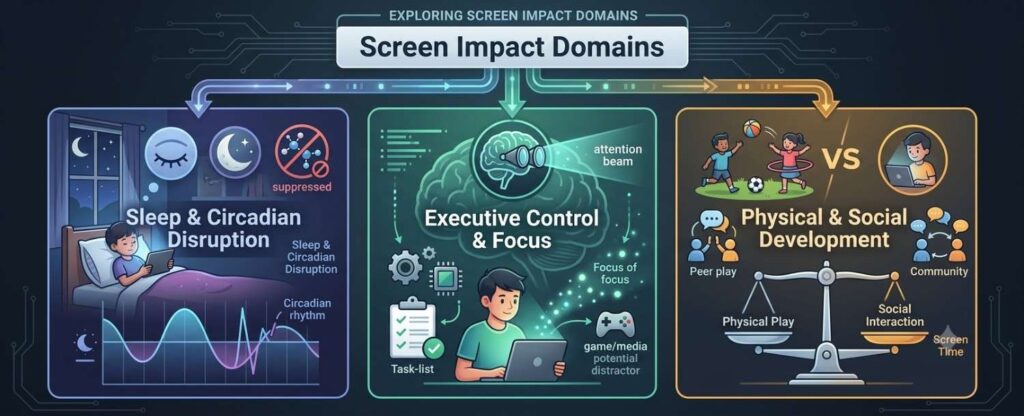
1. Sleep Architecture and Rest
Blue light emitted by smartphones, tablets, and televisions suppresses melatonin production, delaying the body’s natural sleep onset. Fast-paced games or videos also keep a child’s nervous system in a state of high arousal right before bed. Chronic sleep deficit in children leads to reduced attention spans, mood volatility, and weakened immune function.
2. Executive Function and Emotional Regulation
Fast-paced children’s shows and gamified apps deliver rapid bursts of novel stimuli, triggering frequent dopamine releases. Over time, young brains adapt to this intense level of stimulation, making real-world activities—like reading, drawing, or independent play—feel slow or unengaging by comparison. When screens are suddenly removed, the sudden drop in dopamine can cause intense emotional dysregulation.
3. “Technoference” and Displaced Play
When screen use replaces unstructured outdoor play, motor skills and physical health can suffer. Just as importantly, screens can create “technoference”—moments when devices interrupt face-to-face interactions between parents and children. These subtle disruptions reduce opportunities for conversational turn-taking, which is vital for language acquisition and emotional bonding.
Age-Appropriate Screen Time Recommendations
Not all screen time carries equal weight. A live video call with a grandparent offers vastly different developmental benefits than sitting passively in front of auto-playing social media clips.
| Age Group | Recommended Daily Limit | Core Focus & Best Practices |
| Under 18 Months | Avoid all screens (except video calls) | Focus entirely on sensory play, real-world object exploration, and face-to-face eye contact. |
| 18 to 24 Months | Minimal; high-quality content only | Co-view with your toddler. Narrate what is on screen to bridge the gap between digital concepts and real life. |
| 2 to 5 Years | Maximum 1 hour per day | Choose interactive, slow-paced educational shows (e.g., PBS Kids). Avoid algorithmic auto-play apps. |
| 6 to 12 Years | Consistent family limits | Prioritize homework, 60 minutes of daily exercise, and 9–11 hours of sleep before media time. |
| 13 to 17 Years | Self-regulation & media literacy | Focus on content safety, privacy settings, body image impacts, and maintaining digital-free downtime. |
How to Manage Kids’ Screen Time Without Tantrums
The hardest part of setting digital boundaries isn’t picking a rule—it’s enforcing it without an argument. Understanding how to manage kids screen time without tantrums starts with recognizing that screen transitions feel like a sudden loss of a highly rewarding stimulus.
1. Give “Bridge” Warnings, Not Arbitrary Countdowns
Shouting “Five more minutes!” from across the room rarely works because young children lack a mature concept of time. Instead, tie the end of screen time to a clear, natural stopping point within the activity:
- Instead of: “Off in 10 minutes!”
- Try: “You can finish this level, and then the tablet goes on the charger.”
- Try: “When this episode of Daniel Tiger ends, the TV goes off.”
2. Use Visual Timers
For open-ended activities like sandbox games, visual countdown timers (where a colored disk gradually shrinks) help children see time passing without requiring them to read a clock.
3. Validate the Emotion, Hold the Boundary
When a child gets upset because screen time is over, avoid arguing or offering immediate compromise. Validate their feelings while keeping the rule intact:
“I know it’s hard to turn off the game when you’re having fun. It’s okay to feel mad about it, but game time is done for today.”
4. Provide a High-Value Transition Activity
Moving directly from an exciting video game to picking up toys is a recipe for resistance. Bridge the gap with a low-stress, engaging offline activity, such as a sensory tray, helping with a cooking task, or an outdoor snack.
Creating Actionable Digital Boundaries
Rather than relying on real-time negotiations, establish clear, structural rules that remove the need for daily debates.
Establish Screen-Free Zones and Times
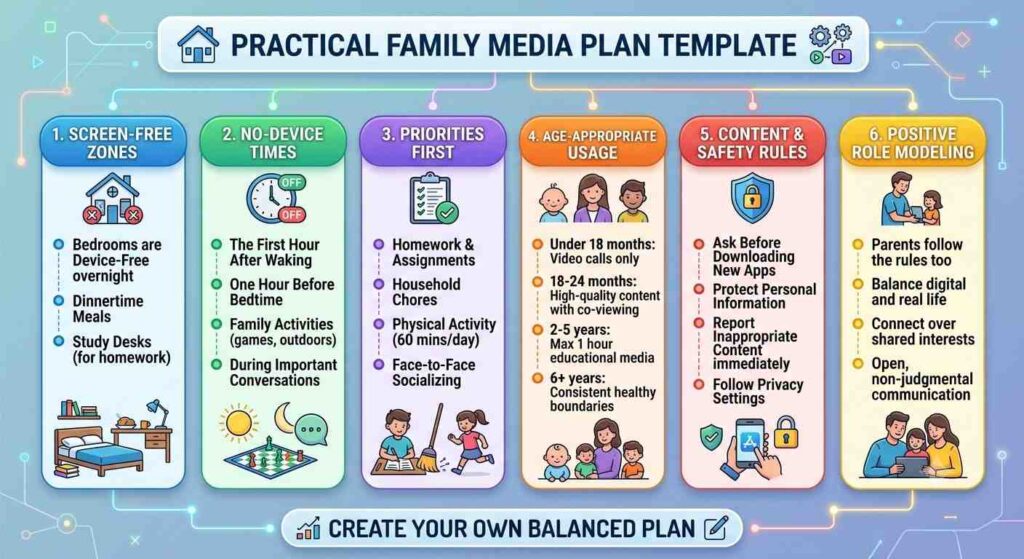
- Bedrooms: Keep televisions, gaming consoles, tablets, and smartphones out of bedrooms overnight. Charge all devices at a centralized family charging station in a common area.
- Mealtime: Keep breakfast, lunch, and dinner screen-free for both children and adults to encourage face-to-face conversation.
- The First and Last Hour of the Day: Reserve the first hour after waking up and the hour before sleep for screen-free routines.
Curate Content Proactively
Focus on active and creative screen use rather than passive scrolling:
- Active/Interactive Use: Coding apps, digital art software, video calls with family, interactive puzzles, and educational building games.
- Passive/Low-Quality Use: Auto-playing short-form video feeds, rapid reaction videos, and games laden with aggressive pop-up advertisements or reward loops designed to keep players hooked.
Practical Family Media Plan Template
A shared agreement gives every family member clarity on expectations. Use this family media plan template as a foundation, tailoring it to your household’s specific needs.
Role-Modeling Healthy Digital Habits
Children pay far more attention to how adults handle technology than to the rules we speak aloud. If parents check notifications constantly during conversations or keep the television running continuously in the background, children naturally internalize that behavior as the baseline norm.
Practice intentional digital wellness:
- Turn off non-essential notifications on personal devices.
- Announce your purpose when picking up a phone around your children (e.g., “I’m checking the weather forecast for tomorrow,” rather than silently looking at a screen).
- Designate device-free family time on weekends to participate in shared hobbies, sports, or outdoor excursions.
Success with digital media isn’t about eliminating technology—it’s about placing it in service of your family’s overall well-being. By establishing clear expectations, choosing high-quality content, and offering supportive transitions when devices go off, you can guide your children toward self-regulation and a healthy relationship with screens that lasts a lifetime.